▲

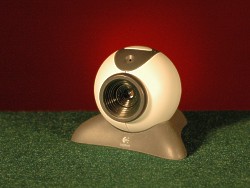 Logitech QuickCam Messenger, Purchased January 2003, $50
Not a bad little camera, but I was a bit disappointed in the image quality, which was just about the same as the Quick Cam Pro purchased 4 years earlier. I do have to admit that the old camera cost 3 times as much, but still, we've had 4 years of technology since then. While not as good as some of the other low cost cameras, this one is reliable and commonly available. It is a good camera if your budget is limited.
The image is a bit washed out. Tinkering with the contrast and brightness controls I was able to improve the image but it is neccessary to change the settings every time the lighting changes. So I used basically auto settings for the tests with one exception. I adjusted the color balance just a bit which improved my facial color from the auto settings. I suspect the off color was due primarily to my burgundy colored walls.
Incidently, this is the camera which has been included for new subscribers to Comcast a year or two ago. I am finding them popping up in allot of free webcam included type offers.
Screen shots of camera configuration settings
Advanced
Device
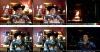 | Sample images showing how this camera performs under different lighting conditions |